 Mazbut
Know your restaurant is running right, even when you are not there
One system from your supplier to your customer's door. The routine steps run by themselves and you approve what matters, on the tablet you already have.
Your whole restaurant, end to end
Every step is connected, so nothing is written down twice or typed again. What can run by itself does; you only decide.
- SupplierWhen an ingredient runs low, the order to your supplier is prepared.You approve, it goes
- StockEvery dish sold takes its ingredients off, by its recipe.By itself
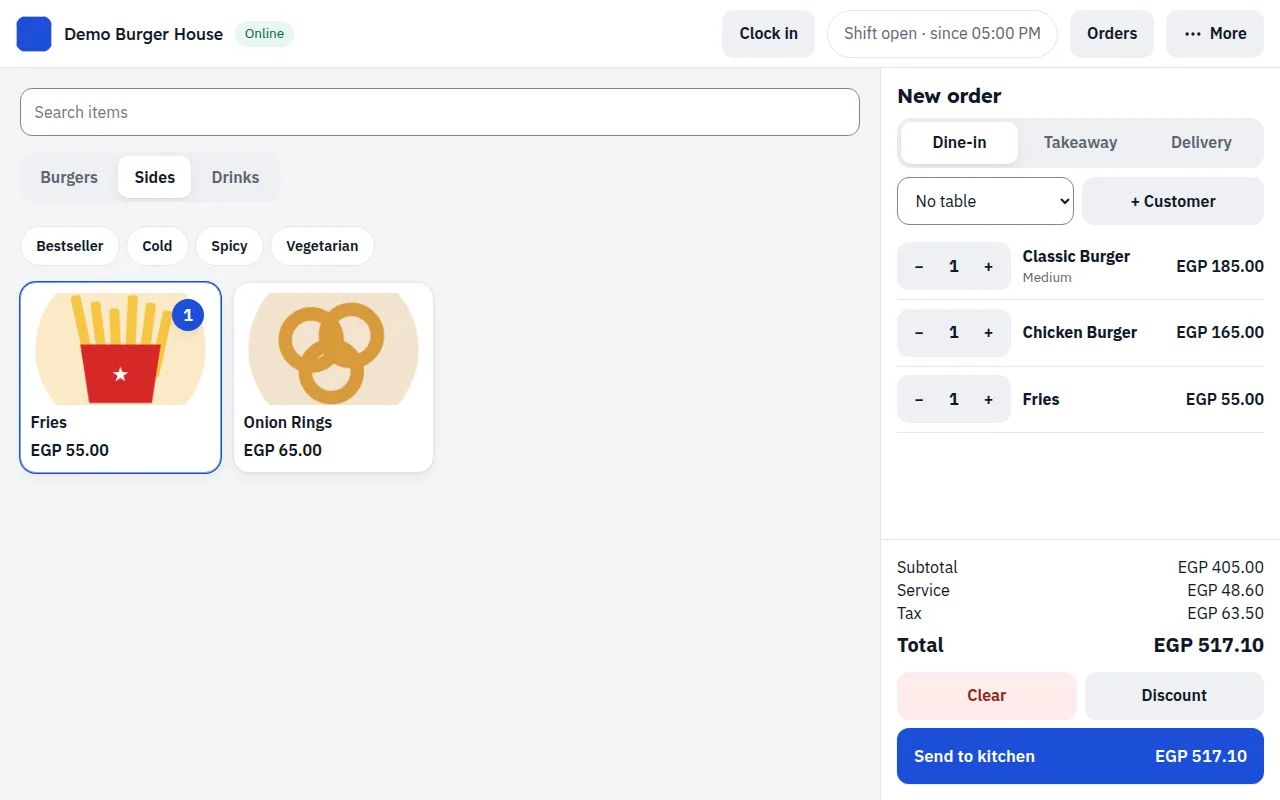
- Till and ordering linkPrices, offers and minimums apply on the right days and hours.By itself
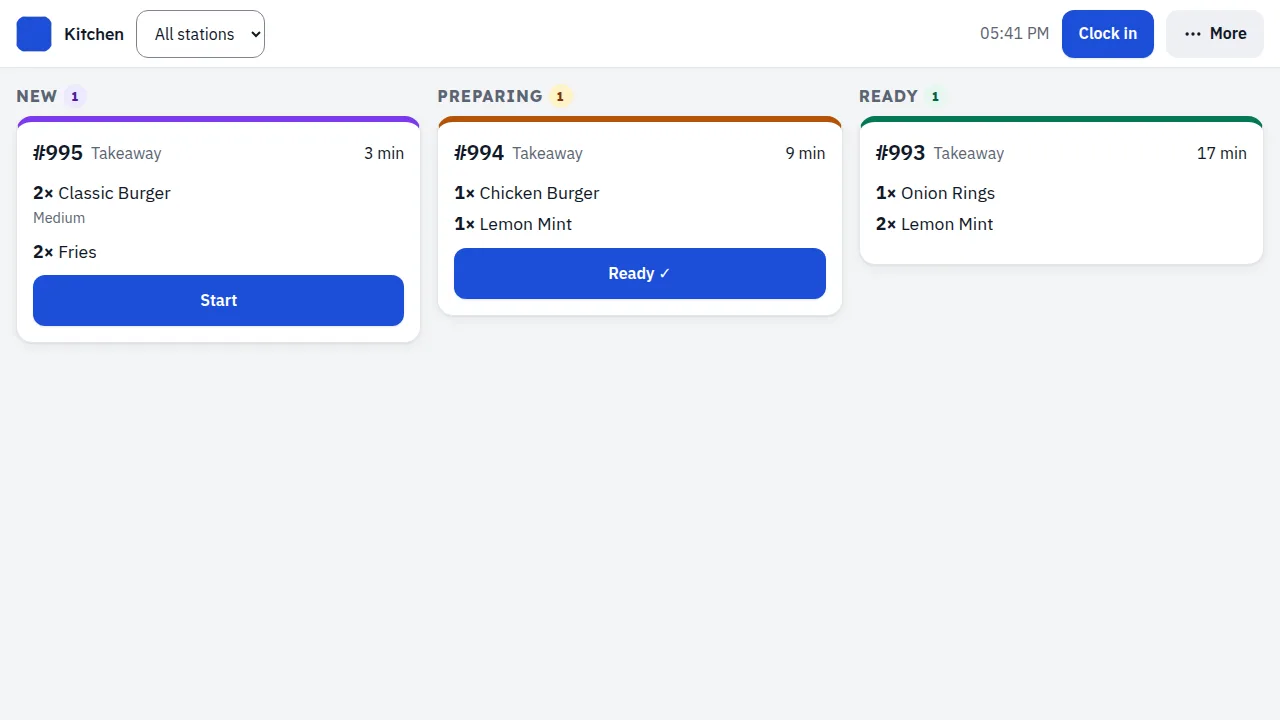
- KitchenEach order arrives on the screen or prints, with a clock against your target.By itself
- DeliveryThe driver gets the address on the phone; the cash is settled at the till.No calls, no paper
- CustomerLive tracking, loyalty points and their account.By itself
- Your numbersYesterday, the month and the year to date, menu engineering and food cost.In your inbox every morning
Five questions every owner asks
Mazbut answers them every day, without you having to ask.
Is the drawer right tonight?
Every shift closes with a count against what should be in the drawer. A shortage shows in red, with the cashier's name.
Who gave that discount?
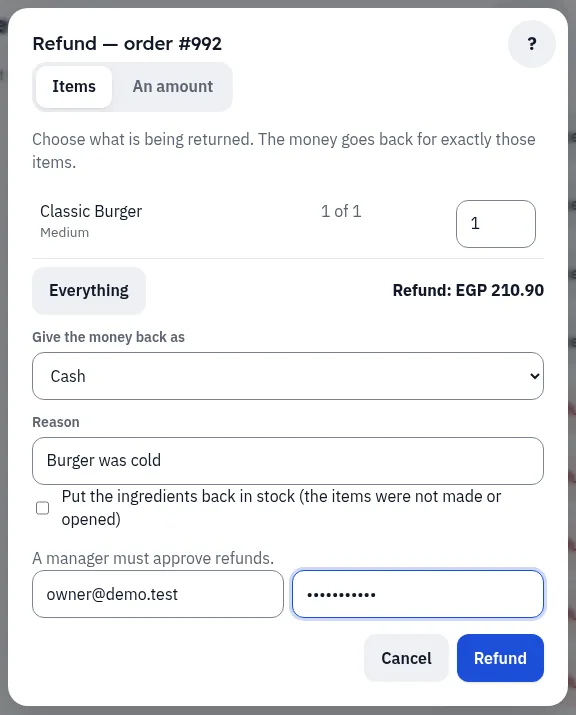
Each cashier discounts up to the limit you set, no further. A refund needs a manager's password, and its reason is kept.
Did the driver bring it all back?
Each driver is settled at the till when they return. A shortfall stays recorded under their name.
Why is table 4 still waiting?
Every order reaches the kitchen screen the moment it is taken, and a late one turns red.
What do I need to buy tomorrow?
Every sale takes its ingredients off. What runs low becomes an order for you to approve.
What are small leaks costing you?
Put in your own numbers. It is an estimate, not a promise: it shows the size of the problem in your restaurant.
The answers, on the real screens
These are the real screens, not drawings. Every screen works in Arabic and English.
Which order is late?
No lost tickets, and late orders turn red
New, preparing, ready, each with its own color. A late order shows its minutes in red, with a sound for each new one.
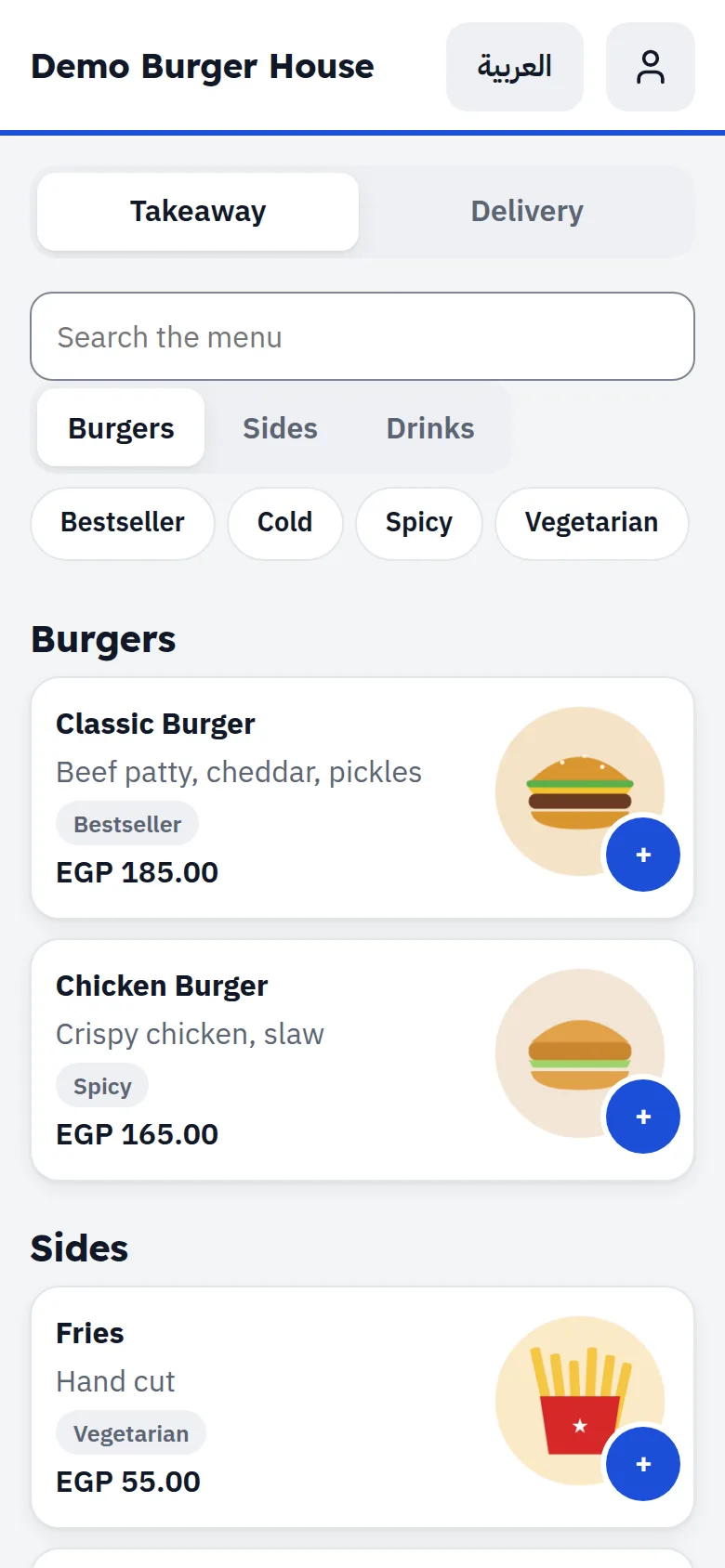
The apps take a cut of every order
Your own link, with no commission
Customers order from their phone, with photos and sections, or from a QR code on the table. Orders land on the same till and kitchen screen.
Who gave that refund?
A manager approves every refund
By item and quantity, with the reason recorded.
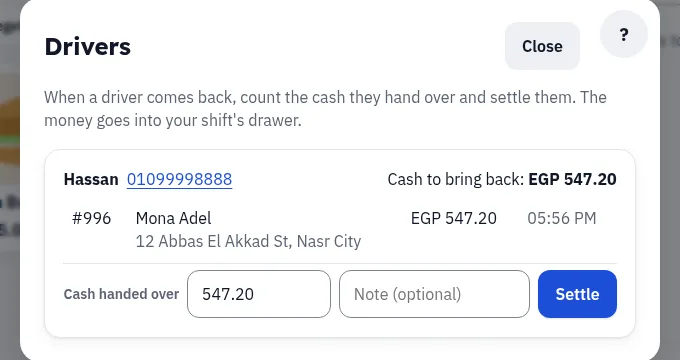
How much does each driver owe?
Every driver's cash, settled in one tap
Count the cash when they return and settle them in one tap.
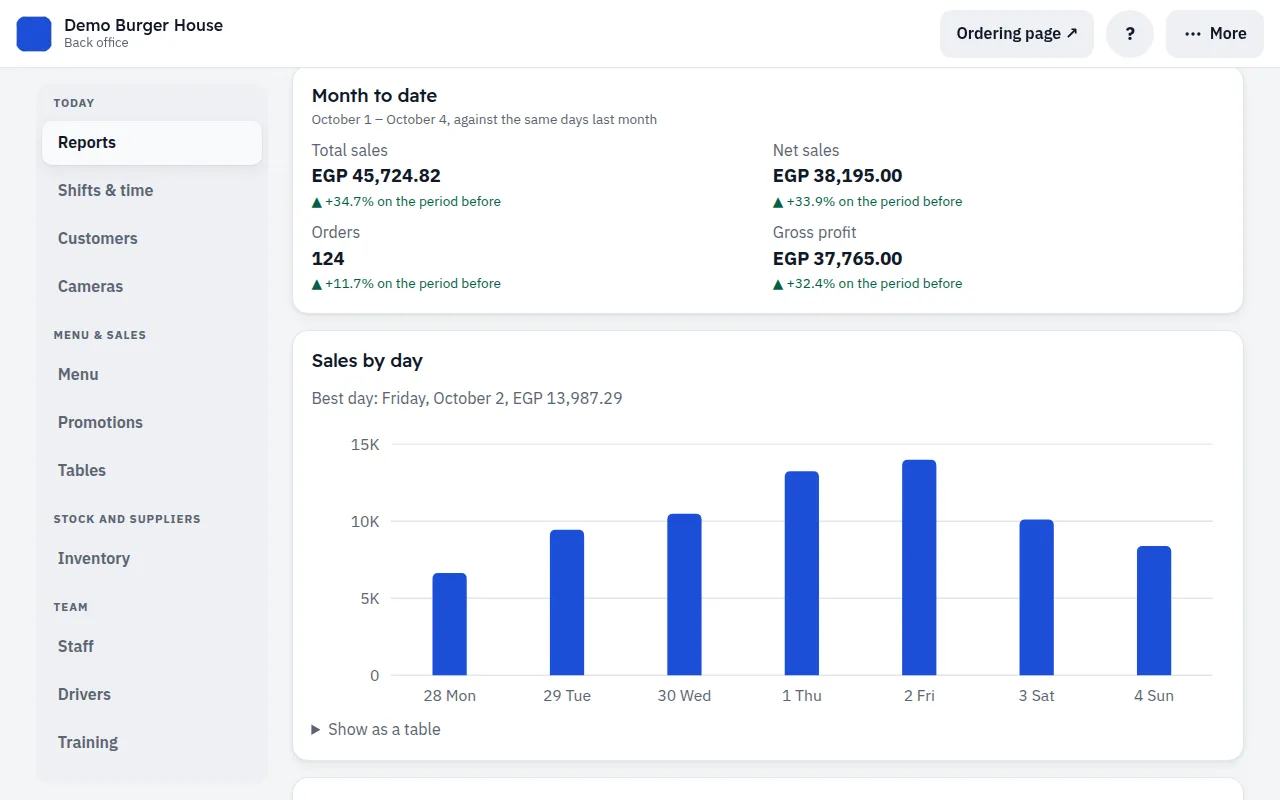
How did yesterday go?
Your numbers every morning, next to last week's
One tap for today, this week or this month, or any dates. Each figure against the period before, sales by day and by hour, and the whole report in Excel.
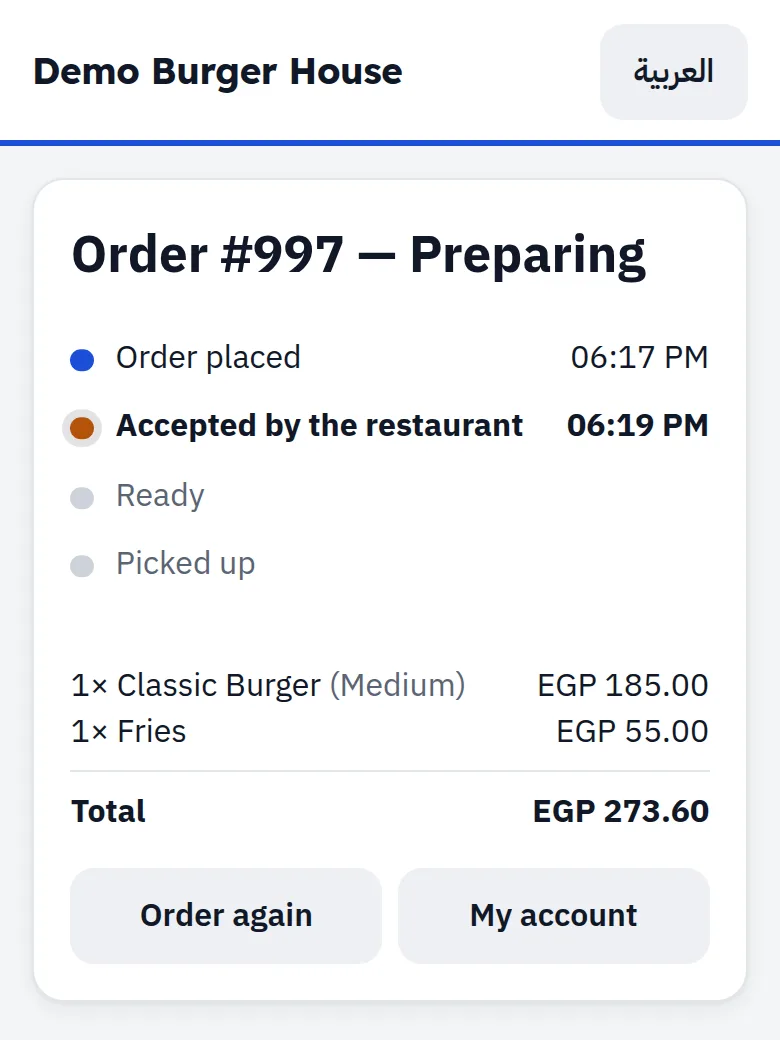
Where did my regulars go?
Customers who order direct, and come back
Your ordering page keeps them informed and gives them a reason to order again.
- They see where their order isPlaced, accepted, ready, on its way, with a button to call you or the driver.
- Points in their own accountThey sign in with their phone number and see their points and past orders. Regulars move up to tiers that earn more.
- Ratings from real ordersOnly a customer who ordered can rate: the QR code on every receipt opens the rating. You answer in public.
- Offers that run themselvesA lunch or late-night offer on a section or the whole menu, on the days and hours you choose. The old price shows crossed out.
- Found on the Mazbut marketplaceIf you want it: customers browse restaurants by food and area, and you pay a commission only on the orders it brings you.
“The internet just dropped.” Keep selling.
Orders and payments are saved on the till and sync when the connection returns, with nothing lost or counted twice. Meanwhile the kitchen works from printed tickets.
Everything else a restaurant needs
What runs by itself, and what stays yours
We would rather say it now than after you sign.
Runs by itself
- Orders reach the kitchen
- Every sale takes its stock off
- Low stock becomes an order you approve
- Offers start and stop at their hours
- Your numbers arrive every morning
Stays with you and your staff
- Cooking, picking and delivering
- Counting the cash
- Approving what you buy
- Accounting and payroll: Mazbut does neither
- ETA e-receipts: Mazbut does not issue them
Start on your own, or let us set you up
On your own: import your menu from Excel, add your staff, and follow the "?" on every screen. Want it done for you? Onboarding is an optional service, paid once:
Send us your menu
With prices, your staff list and your tables.
We enter it for you
Your menu, your recipes and your suppliers, so stock and orders run by themselves from day one.
Half a day at your restaurant
We set Mazbut up on your tablets and train every role.
Go live with us there
On a quiet day, at opening time.
With onboarding, we call you on days 2, 3 and 7 and fix whatever your staff found hard.
One monthly price, less when you pay ahead
No tablets to buy: use the tablet, phone or computer you already have, in an up-to-date browser. Printing receipts without a dialog and the cash drawer need an Android tablet or a computer. Devices and printers are not included.
Onboarding (optional)
Paid once, only if you choose it.
- Your menu and staff entered for you
- Mazbut set up on your tablets
- Training at your restaurant
- Our team with you on the first shift
Monthly subscription
Every screen, for your whole team.
- Till, kitchen screen and back office
- Online ordering and table QR codes
- Refunds, drivers, shifts and stock
- Discounts, loyalty and reports
- Working without internet
- Daily backups and support
Straight answers
Do I need to buy an iPad?
No. Mazbut runs in the browser on Android tablets, iPads, phones and computers. To print receipts without a dialog and open the cash drawer, the till must be an Android tablet or a computer; an iPad works well as the kitchen screen or for the back office. A receipt printer is not included: use the one you have, or buy any 80 mm thermal printer.
What happens when the internet drops?
The till keeps taking orders and payments and prints a ticket for the kitchen. Everything syncs when the connection is back. When we plan maintenance, every screen tells you beforehand.
Can customers pay by card?
At the till, with your bank's card machine; Mazbut records the payment. Online card and wallet payment is an add-on.
Is it connected to Talabat?
Not directly yet. Talabat orders are entered at the till in a few taps. Delivery partners can send orders through the API add-on.
Do you issue ETA e-receipts?
No. If your restaurant must issue e-receipts from the till, Mazbut is not the right fit today, and we would rather tell you now.
Is it in Arabic?
Yes. Every screen, receipt and help page, in plain Egyptian Arabic or in English, right to left where it should be.
Do I have to pay for setup?
No. Start on your own with the Excel import and the "?" on every screen. Onboarding (we enter your menu, set up your devices and train your staff) is optional, paid once.
Does everything run by itself?
The routine does: orders reach the kitchen, stock comes off with every sale, offers apply on time, and your numbers arrive every morning. People still cook, deliver, count the cash and approve what you buy.
What does it need from me?
Recipes for your dishes and your suppliers on Mazbut. Without recipes stock cannot follow sales; without suppliers nothing can be ordered for you. Onboarding enters both.
I have more than one branch
Every branch has its own tables, stock and reports in the same back office. The monthly price covers one branch; each further branch adds a smaller monthly price.
Can I pay for several months?
Yes. Pay 3 months ahead and the onboarding comes free; 6 or 12 months add free months instead. Your price stays fixed until the package ends, and we remind you a month before.
Can tourists pay in dollars or euros?
Yes, in cash. You set the day's rate each morning; the till shows the change in pounds, the receipt shows the rate, and the drawer is counted per currency. Foreign cards go through your bank's machine as usual.
Can my guests read the menu in their language?
Russian, Italian and German, besides Arabic and English. You type the translations once (or fill them in Excel); Mazbut does not translate them for you.
Is my data mine?
Yes. Ask, and we give you your menu and your sales. If you leave, they leave with you.
Book a free visit
We come to your restaurant, show you Mazbut with your own menu, and answer your questions. No commitment.
We start in Sharm El-Sheikh: from Naama Bay to Hadaba and the Old Market, we come to you in person.
Prefer WhatsApp? Message us on WhatsApp